Planes Live - Flight Tracker
- 4.0
- Rating
- 5.00M
- Installs
- Free
- Price

 Analysis by App-foxy
I installed Planes Live - Flight Tracker because I wanted something more visual than repeatedly refreshing an airline page. My main question was simple: does a live radar view actually make travel easier, or is it just an attractive way to watch aircraft move? After using it as a travel and local-information app, I found that the answer depends on what you need. It is most useful when you want a quick picture of air traffic, a flight’s current status, or the airport around a journey. It is less convincing as a complete replacement for airline communication or a detailed trip-planning service.
The app comes from Mosaic Srl and is free to install, with optional in-app purchases ranging from $0.99 to $99.99 per item. It is rated for Everyone, so its presentation is approachable for families, curious travelers, and people who simply enjoy identifying planes overhead. The current version is 1.44.4, and it runs on Android 7.0 or later. Those details matter because this is an app you may install on an older spare phone before a trip, although the experience will naturally depend on that device’s screen and performance.
How I judged the app before relying on it
I treated the app as a decision tool rather than a toy. A flight tracker has to answer different questions at different moments: Is the aircraft moving? Has the departure status changed? What is happening around an airport? Can I understand the map quickly while standing in a busy terminal? A radar screen can look impressive and still be inconvenient if it takes too long to interpret, so I paid attention to how much work was needed to get from opening the app to a useful answer.
You May Also Like

 Blood Strike: 2.5 Anniversary
Blood Strike’s Loadouts Turn Every Drop Into a Tactical Gamble
A close look at Blood Strike’s custom loadouts: how fast access to signature weapons reshapes its battle royale rhythm, rewards preparation, and narrows the gap between fights.

 Pandora - Music & Podcasts
Pandora’s Music Is Easy to Start, but Harder to Recover
Pandora’s strength is its low-effort path from a seed to a station. Its weak spot is how much confidence it asks you to place in connection, setup, and quiet recovery.

 8 Ball Pool
 Is Built on Rivalries, Rematches, and Routine
A close look at the rivalries, rematches, shared routines, and unanswered safety questions that turn a quick pool match into a persistent mobile community.

 Samsung Music
’s Quiet Strength Is Playing What You Already Own
Its reach comes less from spectacle than from dependable access to a personal library. That simplicity is both the app’s strongest retention engine and its ceiling.

 AccuWeather: Weather Radar
AccuWeather Review: A Quick, Clear Forecast for Everyday Decisions
For everyday plans, the best forecast is the one you can understand quickly. AccuWeather makes rain timing, radar, and local conditions easy to act on, with a few trade-offs.

 Hill Climb Racing
Why Hill Climb Racing Still Turns Crashes Into One More Run
A tiny car, a bumpy hill and one more upgrade: Hill Climb Racing keeps resurfacing because its simple chaos makes every near-miss feel personal.
More From Our News Desk



The first useful distinction is between visual awareness and official travel confirmation. A moving aircraft icon can give you a helpful sense of progress, but it should not be treated as the only authority for boarding times, gate changes, baggage instructions, or cancellations. For those details, I would still check the airline or airport’s official communication. Planes Live works best alongside those sources, not in place of them.
I also considered how different types of travelers use this category. Someone meeting a relative at an airport wants reassurance that the flight is approaching. An aviation enthusiast may want to explore the map for longer. A family member waiting at home may prefer a simple way to see whether the journey is underway. A frequent flyer, meanwhile, may care more about dependable alerts and a complete itinerary than about the radar itself. The app’s value changes noticeably between these situations.
The radar map is the app’s strongest reason to exist
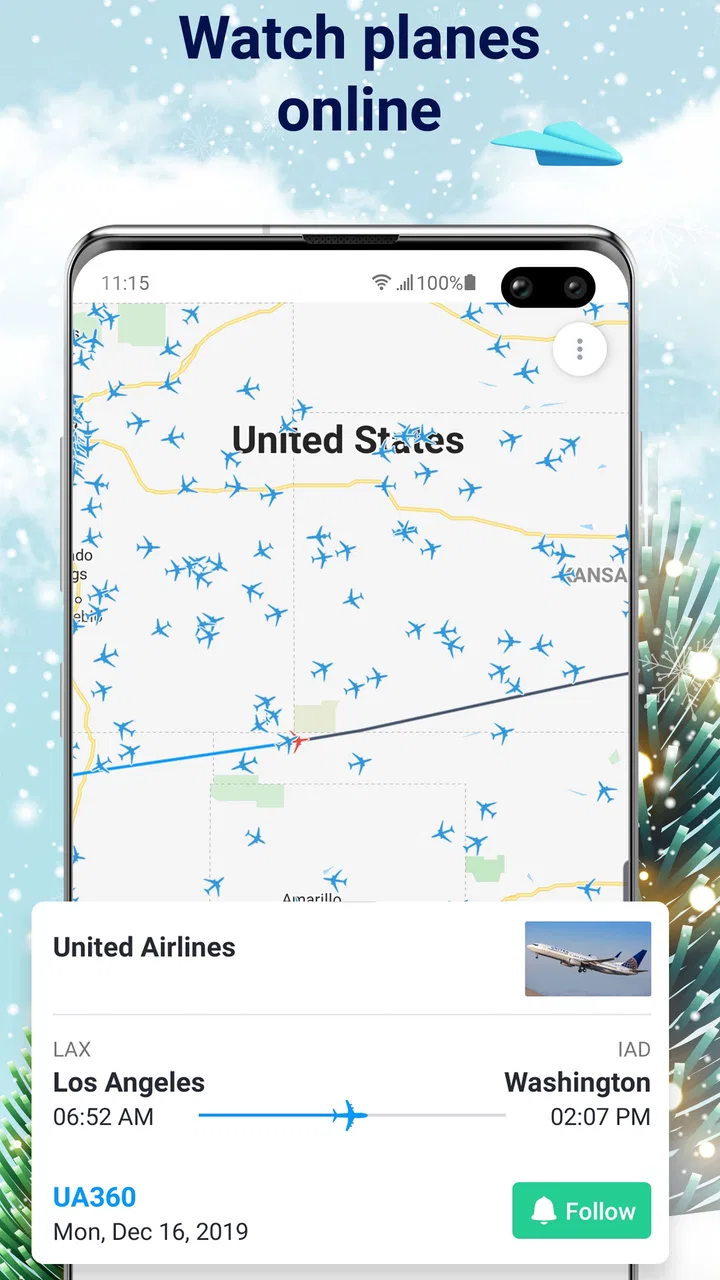
The central experience is the live aircraft map. Instead of reducing a flight to a line of text, it gives you a geographic view of planes in the air and their relationship to airports and surrounding areas. I found that especially useful when I wanted context rather than a single status label. Looking at the map can make a route easier to understand, particularly when a person waiting for a traveler wants a visual indication that the flight is getting closer.
That visual approach also makes the app more engaging than a conventional airline status page. An airline website usually focuses on your booking, while this app encourages you to look outward at the airspace. I could use it to understand the flow around an airport, see how busy the area appeared, and follow the broader movement of aircraft rather than only one reservation. That is a meaningful difference, not merely a cosmetic one.
There is a practical trick here: I would open the map before I need it, search for the relevant flight or airport, and get familiar with the view while I still have time. Trying to learn a radar interface while rushing between terminal signs is frustrating. A minute of preparation makes it easier to recognize the right aircraft and avoid mistaking a nearby route for the one I care about.
Airport information makes it useful beyond one flight
The airport information is another reason I would keep this app installed during a trip. Flight tracking is naturally tied to airports, and having airport context in the same place reduces the need to jump between several unrelated screens. When I was thinking about an arrival or departure, I could approach the situation from either direction: start with a flight and look toward its airport, or start with an airport and inspect the activity around it.
This is particularly handy for people who are not the passenger. Suppose a friend is landing and asks to be collected. I can use the flight view to understand the journey, then use the airport view to orient myself around the destination. That does not replace checking pickup instructions or terminal information, but it gives me a better sense of timing and location than a bare text message saying that the plane is “in the air.”
For airport enthusiasts, this wider perspective may be more enjoyable than the practical travel function. The app turns a local airport into something explorable, even when I am not flying. I would not install it solely for that reason unless I already enjoyed watching aircraft, but it adds genuine depth to the basic tracking task.
A realistic use case: meeting someone after a delay
Imagine that I am collecting a relative in the evening. Their scheduled arrival has already passed, but they have not appeared at the meeting point. Rather than repeatedly asking for updates, I can check the flight’s position and see whether the aircraft is still approaching, circling, or apparently finished with the journey. The map gives me a more immediate picture of what may be happening, while airport information helps me keep the destination in view.
Even in that scenario, I would use the app as a planning aid, not as permission to leave the pickup area based on a map icon alone. Ground delays, disembarkation, baggage collection, and walking through a large terminal can all separate landing from meeting someone. The useful insight is that the tracker helps me decide when to pay attention; it does not tell me exactly when the passenger will reach the curb.
This is where the app feels more valuable than a generic map. A regular map can show the airport’s location, but it does not frame the journey around aircraft movement. An airline page can show the passenger’s flight, but it may not give the same broad visual understanding of nearby air traffic. Planes Live sits between those two experiences.
Where it wins, where other tools fit better, and what switching involves
I find the choice between this radar-first app and a familiar airline tool comes down to what I want to know: the aircraft’s broader movement, or the exact instructions for my own trip. I’d keep both available for one journey, then notice whether the map helps with a real decision—such as when to leave for a pickup—rather than opening it out of habit. That distinction also makes the app’s lasting value easier to judge.
Why I would choose it over a basic airline page
I would choose Planes Live when the map itself is part of the answer. If I am curious about what is flying over a city, waiting for someone and wanting a visual update, or trying to understand activity around an airport, the radar presentation is more informative than a plain status box. It also avoids limiting my attention to one airline’s ecosystem, which is helpful when I am following someone else’s trip or watching several routes in the same area.
The app has also attracted a substantial audience: it has more than five million installs and an average rating of four out of five from roughly seventy-one thousand ratings. Those figures do not guarantee that it will suit my habits, but they suggest that the core idea is understandable to a wide range of users. I still read the rating as a broad signal rather than proof of perfect reliability, because expectations for a flight tracker vary greatly between casual users and frequent travelers.
Another advantage is the low barrier to trying it. Since the basic app is free, I can install it before a trip and decide whether the radar view helps me without committing to a subscription at the outset. That is useful for occasional travelers who may not want a permanent travel-management app. The trade-off is that optional purchases can change how much of the experience is available without payment, so I would inspect the upgrade prompts before making the app part of my regular routine.
When a different category is the better choice
I would not choose this as my only travel app. If my priority is booking, storing reservations, managing a complete itinerary, or receiving instructions tied to a particular airline, an airline app or dedicated itinerary manager is likely a better fit. Those tools are designed around the passenger’s trip, while Planes Live is designed around seeing flights and airports in context.
I would also be cautious if I needed operational certainty. A radar display is compelling, but the decision to leave for the airport, change a pickup time, or react to a cancellation should come from the most direct official source available. The app can help me notice that something deserves checking; it should not be the final word when money, connections, or a tight schedule are involved.
For someone who only wants a notification about one booked flight, a simpler status tool may feel less distracting. Planes Live invites exploration, and that is part of its appeal, but exploration can become unnecessary when I only need a departure reminder. Conversely, someone who wants to watch aircraft as a hobby may find the visual map more satisfying than a narrow booking-focused application.
Small frictions that affect everyday use
The map-first design can require more interpretation than a list. I may need to identify the correct aircraft, understand its position relative to the airport, and connect the visual movement with the travel information I already have. That is not difficult after some use, but it is less immediate than reading a clear airline status such as “boarding” or “gate changed.” For a nervous traveler, extra visual detail may not always feel like extra clarity.
The free entry point is welcome, yet the presence of in-app purchases means I would not assume every useful capability is included without checking the current screens. The listed purchase range runs from $0.99 to $99.99 per item, which is a wide span. I would avoid paying simply because I am traveling that day; first I would use the free experience, identify the exact limitation affecting me, and decide whether the added value matches how often I fly.
There is also a human limitation: tracking can encourage overchecking. I have found that opening a radar repeatedly does not necessarily produce better travel decisions. A sensible workflow is to check when leaving for the airport, around a meaningful delay, and before arranging a pickup. Between those moments, official messages and common-sense timing are usually more useful than watching every movement.
What it costs to switch from familiar alternatives
Moving from an airline app to Planes Live does not require abandoning the airline app. The real cost is learning a second way to think about flight information. An airline interface usually starts with the booking reference or flight number. This app encourages me to start with a map, an airport, or the broader movement of aircraft. That change is worthwhile if I value geographic context, but it may feel like needless extra effort if all my travel is already organized in one airline account.
The easiest transition is to use both for one journey. I would keep the official airline source for booking details and alerts, then use Planes Live when I want to understand the flight’s position or the activity around the airport. This split avoids the common mistake of expecting one app to handle every travel responsibility. It also gives me a clear way to judge whether the radar view genuinely saves time or merely adds another screen to check.
For an occasional traveler, switching is nearly risk-free because the app is free to try and carries an Everyone content rating. For a frequent traveler, the decision deserves more thought: the benefit is not just seeing a plane icon, but whether that visual context improves pickup planning, family communication, or airport awareness often enough to justify another travel tool.
My recommendation for different kinds of users
I recommend Planes Live to travelers who think visually, people who regularly meet arrivals, families following a journey from home, and anyone who enjoys exploring aircraft activity around airports. It is also a good companion for a trip when I want something broader than a single airline’s status page. The combination of flight movement and airport information gives it a clear identity in the Travel & Local category.
I would recommend skipping it if I only need booking management, official disruption instructions, or a minimal notification for one flight. In those cases, the airline’s own app or a focused itinerary tool may involve fewer steps. I would also skip optional spending until I have used the free version long enough to understand whether the radar and airport views solve a real problem for me.
After using it, my honest view is that Planes Live - Flight Tracker is best understood as a visual companion, not a complete travel command center. Its strongest moment is when a map answers a question that a text status cannot: where the aircraft is in relation to the airport and the surrounding airspace. Its weakest moment is when I expect that same map to provide the official, final answer about every part of my trip.
For me, that is enough to justify keeping it available for travel days and airport watching. I would open it before a pickup, use it to build context around a flight, and then confirm important decisions through the airline or airport. If that sounds like the way you travel, this free app from Mosaic Srl is worth trying. If you prefer one streamlined source for reservations and official updates, the usual airline alternative will probably serve you better.
FAQs for Planes Live - Flight Tracker
01What features does Planes Live - Flight Tracker offer?
Planes Live - Flight Tracker provides real-time flight tracking, allowing users to monitor flights worldwide. It includes detailed flight information such as departure and arrival times, flight status, and route details. Additional features include airport information, weather updates, and the ability to set notifications for flight changes.
02Is Planes Live - Flight Tracker available for both Android and iOS?
Yes, Planes Live - Flight Tracker is available for download on both Android and iOS platforms. Users can find the app in the Google Play Store for Android devices and the Apple App Store for iOS devices, ensuring compatibility with a wide range of smartphones and tablets.
03Does Planes Live - Flight Tracker require an internet connection?
Yes, an active internet connection is necessary to use Planes Live - Flight Tracker effectively. This requirement ensures that users receive the most current and accurate flight information, including real-time updates and notifications regarding flight status and changes.
04Are there any in-app purchases or subscription fees?
Planes Live - Flight Tracker offers a free version with basic features. However, there are in-app purchases and subscription options available for users who wish to access premium features such as ad-free usage, additional notifications, and more detailed flight information.
05How accurate is the flight tracking information provided?
Planes Live - Flight Tracker sources its data from reliable aviation databases and flight information providers. While the app strives to offer accurate and up-to-date information, occasional discrepancies can occur due to rapidly changing flight conditions and data transmission delays. Users should verify critical information directly with airlines when necessary.
Pros
- Real-time flight updates enhance travel planning.
- User-friendly interface for quick navigation.
- Detailed airport information available.
- Customizable notifications for flight changes.
- Works offline for saved flight data.
Cons
- Ads can be intrusive without premium upgrade.
- Limited features in the free version.
- Occasional delays in flight updates.
- Requires internet for real-time tracking.
- Some features locked behind paywall.

Planes Live - Flight Tracker
Gallery